Weekend Ideas
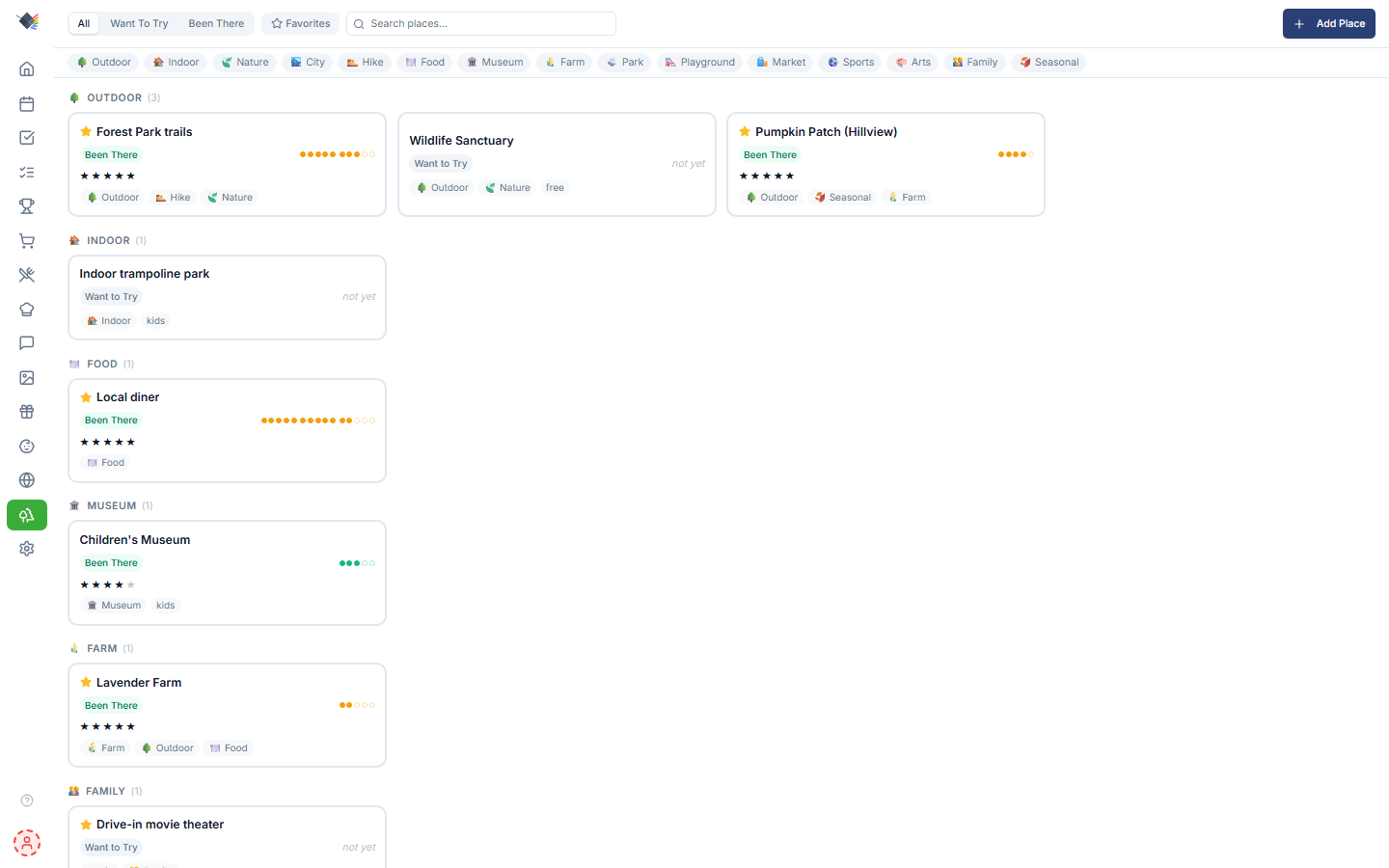
A family activity board for local places to visit. Lower-stakes than the Travel Map (which is global trips and bucket-list pins), more structured than a Notes-app list. Built around the question: "what should we do this weekend?"
What it tracks
A "weekend place" is anywhere your family might spend a few hours: parks, restaurants, museums, trails, farms, drive-ins, indoor play spots. Each entry has:
- Name (required)
- Description: what it is, why it's worth going.
- Website: optional link to the place's website.
- Status:
Want to Try(haven't been yet) orBeen There(visited). - Favorite: boolean star for filtering.
- Rating: 1-5 stars, set on the place (available once it's marked "Been There").
- Notes: free-form text.
- Tags: chosen from a fixed preset palette (see Tags).
- Visit count: increments each time you log a visit.
- Last visited: the date of the most recent logged visit.
Places also carry optional location fields (place name, address, latitude/longitude) that show in the detail panel when present, but these are not currently editable from the app UI.
Adding a place
Weekend → Add place opens the modal. Required: name. Everything else optional.
Two starting statuses:
- Want to Try: default. You haven't been yet, this is something to try.
- Been There: already been; you're adding it retroactively as a favorite or for record-keeping. Marking a place "Been There" reveals the star rating field.
The Weekend page
Cards grouped by tag
When your places span more than one tag, place cards group into sections (one section per preset tag they use, in preset order) so you can scan by activity type at a glance. Each section is headed by the tag's emoji and label (e.g. 🌳 Outdoor, 🍽️ Food, 🏛️ Museum, 🌾 Farm) with a count. A place is bucketed by the first of its tags that matches a preset.
Places whose tags don't match any preset (or have no tags) fall into a final 📍 Other section.
Cards keep the list's default order within a section (most recently updated first); there is no separate in-group sort. When every place shares a single tag category, the page shows a flat grid with no section headers.
Visit-frequency dots
Each visited card shows pip dots representing visit count, grouped in 5s. So 12 visits = ●●●●● ●●●●● ●●. Pips are shown for up to 15 visits; past that the display collapses to a ×N count. At a glance you can see which places get heavy rotation vs. one-off visits.
Filters
Filter chips at the top:
- Status: All / Want to Try / Been There.
- Favorites only toggle.
- Tags: multi-select chips from the preset palette; a place must carry every selected tag to show.
- Search: free-text match on place name.
Side panel detail view
Tap any card to slide out the detail panel with:
- All the place's metadata (including location fields when present).
- Edit button for changes.
- Mark as Visited action (labeled Log Another Visit once the place has already been visited).
- Favorite toggle.
Marking a visit
Tapping Mark as Visited (or Log Another Visit on a place you've already been to) is a single tap. There's no per-visit date/rating/notes prompt. It immediately:
- flips the status to
Been There(if it was stillWant to Try), - increments the visit count,
- sets last-visited to today.
Rating lives on the place itself and is set via Edit, not per visit. Subsequent visits don't change status. They just increment the count and update last-visited.
Tags
Tags come from a fixed preset palette, selected as toggle chips in the Add/Edit form and in the filter row. There is no free-text tag entry. The full set:
outdoor, indoor, nature, city, hike, food, museum, farm, park, playground, market, sports, arts, family, seasonal.
The same presets drive the tag grouping on the page: a place lands in the section of the first preset tag it carries; anything untagged (or with no preset match) goes to Other.
Use cases
"What should we do Saturday?"
Filter to Want to Try, then narrow by a tag or two you're in the mood for. Surface places you haven't been yet.
"Where do we always have a good time?"
Turn on Favorites only: your regulars, and the ones with the fullest pip rows, rise to the top.
"We're hosting cousins this weekend"
Filter by tags like family + outdoor. Open the detail panel of any place you're considering and screenshot to share with the visiting parents.
Family activity scrapbook
Marking visits builds a running count and last-visited date per place, so you can tell which spots are in heavy rotation and roughly when you last went.
Privacy
Weekend places are local to your Prism database. Nothing about your places, visits, or notes is sent to any external service.
Roadmap (not shipped yet)
The current Weekend Ideas is Phase 1 (manual entry, list/filter UI). On the roadmap:
- Per-visit history: record each visit as its own dated entry (who went, rating, notes) rather than just a running count.
- Location editing + geocoder: search a place by name or paste a maps link to attach coordinates from the app.
- POI search + map view: search nearby attractions and add directly from results; visualize your backlog as pins on a regional map.
- Suggest mode: given current weather + season + family preferences, surface a few suggestions for "today's outing."
- Share / collaborate: share a backlog with another family.
Troubleshooting
Side panel doesn't open on tap
Was a bug in v1.5.0: WeekendView was missing its <PageWrapper> wrapper, causing the side panel context to not initialize. Fixed in v1.5.1. If you still see this, hard-reload.
Group "Other" has places I expected to be categorized
Grouping is driven by the fixed tag presets. A place only lands in a named section if it carries one of the preset tags; anything else falls into Other. To move it, edit the place and add a recognized preset tag.