Goals & Points
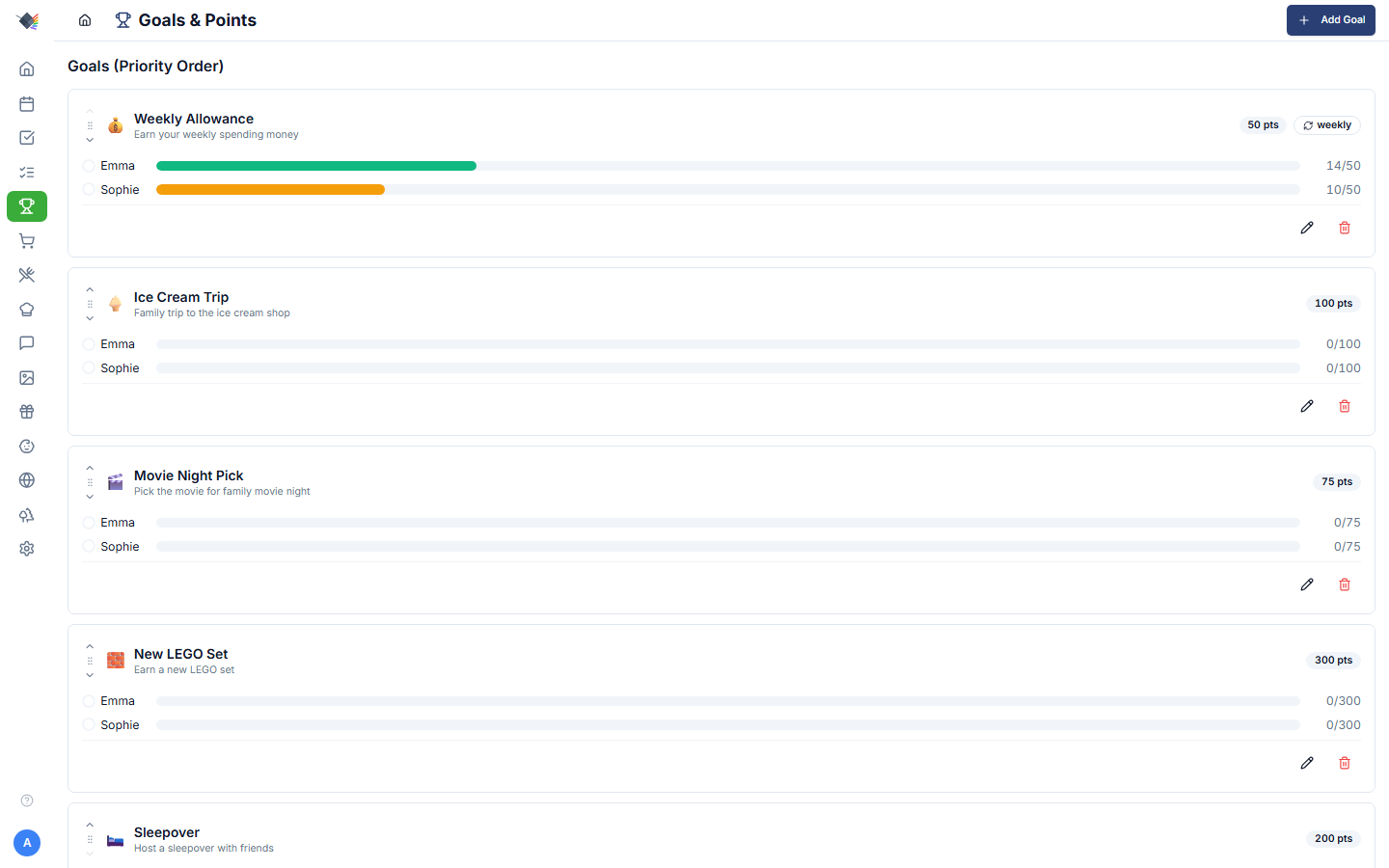
Kids earn points by completing chores. Parents set goals (toys, treats, privileges) with point costs. Earned points flow into goals in priority order via a "waterfall" allocation, and seasonal celebrations fire when a goal is achieved.
How points work
Earning
Points come from approved chore completions:
- A parent creates a chore with a
pointValue(any integer, 0+). - A child marks the chore complete.
- If the chore is flagged Requires approval (the default for new chores), the completion sits in "Pending approval": points haven't been awarded yet. It waits for a parent whether it was marked in the app or by voice. A chore without the flag is approved as soon as the child completes it, and steps 3 and 4 are skipped.
- A parent approves. Points hit the child's running totals.
- If a parent marks the chore complete (for themselves, or crediting the child), it is approved at once and step 4 is instant. By voice, a chore flagged
requiresApprovalalways waits for in-app approval, because the speaker cannot be verified.
Each completion records the point value awarded (pointsAwarded column on chore_completions), copied from the chore's default pointValue at completion time. To change what a chore is worth, edit the chore's point value in the chore editor.
Counters
Each child has running totals at multiple windows:
- This week: Sun-Sat (or Mon-Sun depending on Settings → General → Week Starts On).
- This month: calendar month.
- This year: calendar year.
- All time: since the chore tracking started.
Pending-approval points (chores marked complete but not yet approved) display separately so kids can see what's queued.
Goals
A goal is a thing kids work toward by accumulating points. Examples from the seed:
- Weekly Allowance: 50 pts, recurring weekly. Resets every Sunday.
- Ice Cream Trip: 100 pts, one-time. Accumulates across weeks.
- Movie Night Pick: 75 pts, one-time.
- New LEGO Set: 300 pts, one-time. Slow burn.
- Sleepover: 200 pts, one-time.
Per-goal config
- Name (required)
- Description
- Emoji: chosen from a fixed palette of preset icons (🎯 🍦 🎬 🎮 📱 🎁 🏖️ 🎪 ⭐ 💰 🍕 🎵).
- Point cost
- Priority: integer, 1 = highest. Used for the waterfall.
- Recurring: boolean.
- Recurrence period:
weekly/monthly/yearlywhen recurring.
One-time vs. Recurring
- One-time: points accumulate continuously until the goal is achieved. Once a parent resets an achieved goal, its progress starts over at 0 (or it can be deleted).
- Recurring: points only count for the current period. At period reset (Sunday midnight for weekly), unspent points expire. The kid has to re-earn them next period. Used for steady rewards like allowance.
The waterfall
When a child earns points, those points fill goals in priority order, not equally. The algorithm:
- Sort the child's active goals by priority (1 = highest first).
- For each goal:
- Calculate
available_for_this_goal = min(points_remaining, goal.pointCost - current_progress). - Add to that goal's progress.
- Subtract from
points_remaining. - If a recurring goal: only points from the current period count toward its target.
- Once
points_remaining = 0, stop.
In practice this means: if Emma has 50 points and her Weekly Allowance (50 pts, priority 1) isn't filled, every point goes there first. Once allowance is filled, overflow continues down the list to Ice Cream Trip, Movie Night, etc.
You can change which goal gets filled first by adjusting priority order: Goals page → priority arrows ▲▼ next to each goal.
Goals page
Per-child sections
Each child has their own section showing:
- Avatar + name + color.
- Point counters: This Week / This Month / This Year totals.
- Goal progress cards: one per active goal, with progress bar.
Click into a goal card for details and (parent-only) controls.
Goal cards
Each card shows:
- Emoji + goal name.
- Point cost.
- Progress bar: child's progress toward the goal.
- Recurring badge (if applicable) with the period.
- Achieved! checkmark when the bar fills.
When a goal is achieved, the celebration animation fires (see below).
Parent controls
Parents see additional controls per goal:
- Edit: modify any field.
- Delete: remove the goal.
- Reorder priority: ▲▼ buttons or drag.
- Reset: an inline button on achieved one-time goals. Clears the goal's achieved/progress state and starts it over from 0.
Children see goals and progress but cannot create, edit, or reset.
Celebrations
When a child's progress on a goal hits 100%, an animation plays. The animation is season-aware: the same "you reached your goal" event plays a different scene depending on the week of the year:
| Window | Animation |
|---|---|
| Valentine's week | Hearts |
| St. Patrick's week | Leprechaun + gold |
| Easter week | Easter bunny + eggs |
| Mother's Day week | Spring flowers |
| Memorial Day week | Flags + stars |
| July 4th week | Bald eagle + fireworks |
| Halloween week | Jack-o-lantern + bats |
| Thanksgiving week | Cornucopia |
| Christmas week | Santa's gift bag |
| New Year's week | Fireworks + confetti |
| All other times | Trophy + confetti |
The animation respects prefers-reduced-motion and Performance Mode. Both skip the visual but still fire the completion event so the celebration counter increments.
Dashboard widgets
PointsWidget
Compact summary on the dashboard:
- Per-child name + color.
- This week's points earned.
- Top-priority goal progress bar.
- Checkmark on achieved goals.
- Lazy-loaded.
Sized for a corner of a 4-column grid (default 3×5 cells).
ChoresWidget
Not strictly a goals widget, but it's where pending-approval points become visible. Parents see pending-approval chores at the top of the widget; tapping one approves and awards points immediately.
Resetting an achieved goal
When a one-time goal is achieved, a parent can reset it to start over:
- Tap the inline Reset button on the achieved goal.
- The goal's
goal_achievementsrows are deleted and itslastResetAtis bumped, so progress starts over at 0.
Reset clears the goal's achieved/progress state for the goal as a whole (all children who were working toward it), not just one child. It is not PIN-gated and is not recorded in the activity log.
The reset is the "give the kid the reward, then start fresh" moment. Prism doesn't track delivery, just the bookkeeping.
For recurring goals (allowance), reset isn't a thing. The points simply roll over at period reset.
Permissions
| Action | Parent | Child |
|---|---|---|
| View goals + progress | Yes | Yes |
| Create / edit / delete goals | Yes | No |
| Reorder priority | Yes | No |
| Reset an achieved goal | Yes | No |
| See pending-approval queue | Yes | Own only |
Cache invalidation
The chores-points-goals chain is the most interconnected cache surface in Prism:
- Chore CRUD invalidates
chores:*and triggers a cascade topoints:*andgoals:*. - Chore approval invalidates the same chain.
- Goal CRUD invalidates
goals:*andpoints:*. - Goal reset invalidates
goals:*andpoints:*.
If you ever see stale point totals after a chore approval, hit Sync on the dashboard or check the Redis cache; cache invalidation went through three rewrites before landing on the centralized invalidateEntity() helper that now handles this correctly.
Common workflows
Allowance + occasional treats
- Set "Weekly Allowance" recurring weekly, priority 1, cost 50.
- Set 2-3 one-time goals (Ice Cream Trip, Movie Night, LEGO Set) at lower priorities.
- Result: allowance always fills first, overflow rolls into the bigger goals.
Saving for a big-ticket item
- Set "Bike Helmet Upgrade" one-time, 500 pts, priority 1.
- All earned points go there until it fills. Kids see the bar climb week by week.
- Once achieved and reset, drop priority or delete.
Behavior incentive
- Quick-win goal at low point cost (25 pts, "Pick the dinner") at high priority.
- Resets weekly. Kid earns it almost every week if they do their chores.
Troubleshooting
"I approved a chore but points didn't update"
Hard-reload the dashboard. The cache invalidation should be automatic but a stale tab might miss the refresh. Check the audit log to confirm the approval recorded.
Recurring goal didn't reset on Sunday
The reset happens at midnight local time on the configured week start. If your Week Starts On setting is Monday, recurring weekly goals reset Mondays.
Two kids have the same goal: point totals are wrong
Goals are global (one row per goal), but progress is tracked per-child via the goal_achievements table. Each child has independent progress on the same goal. If you're seeing wrong totals, check that the chore completion completedBy is correct. That's the field that determines whose points-jar gets credit.
Celebration animation didn't fire
Check prefers-reduced-motion (System Settings → Accessibility) and Performance Mode (Settings → Appearance). Either one suppresses the animation, but the goal-achievement event still records.