Shopping
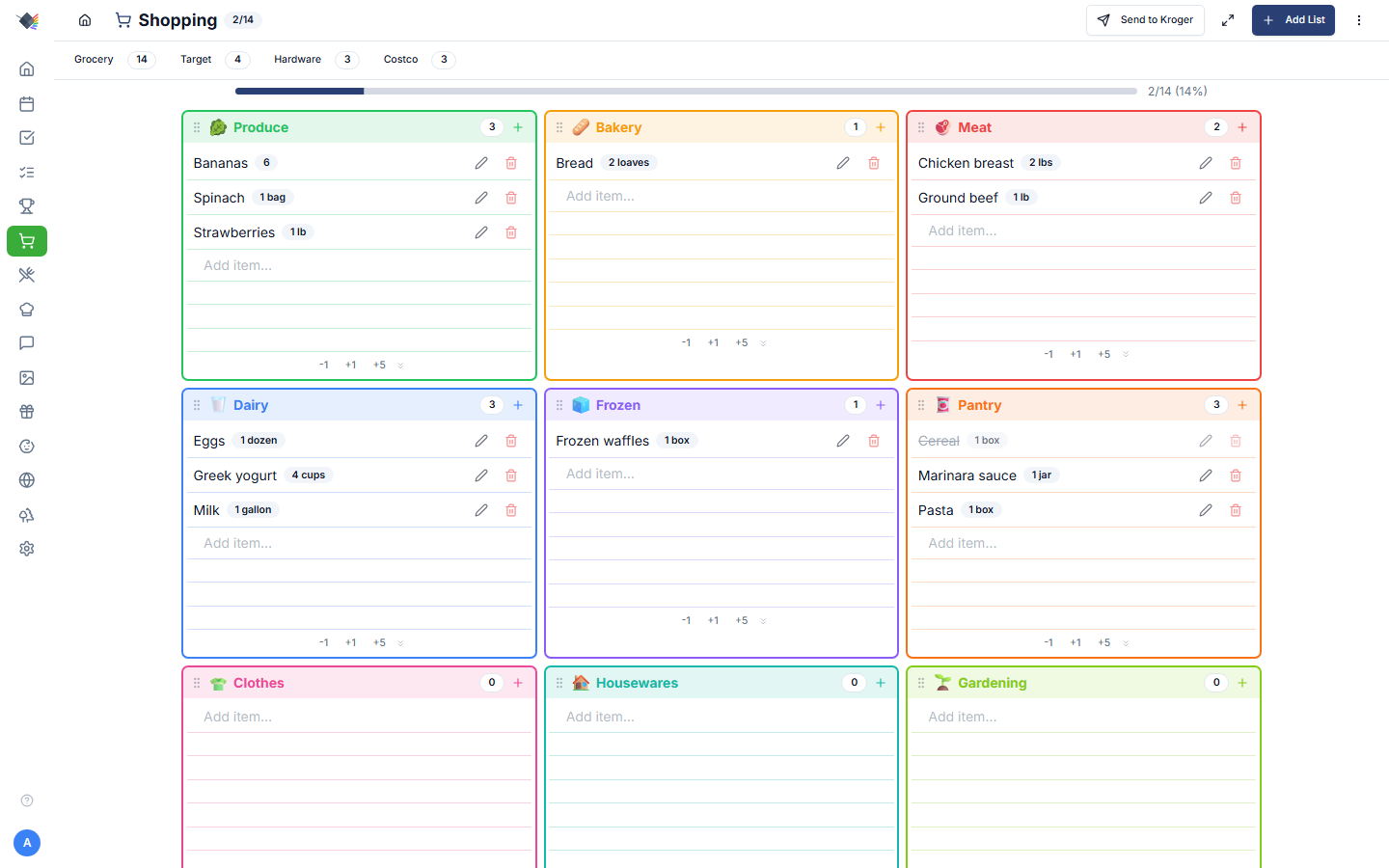
Multiple lists, drag-to-reorder categories, per-person attribution, camera + USB barcode scanning, Microsoft To Do sync, and one-click push to your online Kroger cart at any banner. Built for the in-store experience as much as the at-home planning one.
Lists
A Prism instance can hold any number of shopping lists. Common shapes:
- Grocery: produce / dairy / meat / bakery / frozen / pantry layout.
- Hardware: Home Depot / Lowe's style.
- General: Target, Costco, anywhere else with mixed categories.
- Per-store lists: separate Mariano's and Costco lists for the same week (different default stores in the Kroger picker).
Create one in Shopping → New List. Each list has:
- Name
- Icon (Lucide icon name)
- Color
- List type:
grocery/hardware/general. Affects category layout (grocery uses the 6-category grid). - Visible categories: null = show all; or pick a subset for non-grocery lists.
- Assigned member (optional): for personal lists that should only show to one family member.
Tap a list tab to switch between them. The active list persists in localStorage.
Categories
For grocery lists, items fall into a 6-category grid:
- Produce (green)
- Bakery (brown)
- Meat (red)
- Dairy (blue)
- Frozen (cyan)
- Pantry (amber)
For non-grocery lists, categories are open-ended: you can use any string (clothes, housewares, electronics, garden).
Drag-to-reorder
Grab the grip icon (⋮⋮) on a category header to drag categories into the order that matches your store. The order persists to localStorage as prism:grocery-category-order and applies to all grocery lists.
Empty rows
Each category card shows 6 empty lines by default. +1 / -1 / +5 buttons adjust per-card; minimum 1 empty line so there's always somewhere to tap.
Adding items
Three ways:
- Inline input: text field in each category card. Type, press Enter, item added with that category pre-assigned. Tab or click away also adds.
- + button in the category header: opens the Add Item modal with the category pre-selected. Use this when you want to set quantity, unit, or notes at creation time.
- Barcode scan: phone camera or USB scanner (see below). Auto-fills name from Open Food Facts, picks a category.
Each item supports:
- Name (required)
- Quantity (integer)
- Unit (
gallon,lbs,oz,dozen,box, etc., free text) - Category
- Notes
Toggling items
Tap an item row to mark it checked. Visually: strikethrough text, dimmed color. The progress bar at the top of each list animates in real time as items get checked off.
No checkboxes: the entire row is the tap target. Cleaner on mobile, easier in-store with one hand.
Optimistic UI: the check fires before the API responds, so the strikethrough is instant even on a slow connection. If the server rejects (rare), the row reverts.
Editing / Deleting
Each item row has always-visible inline Edit (pencil) and Delete (trash) buttons on the right:
- Edit: tap to open the modal with current values.
- Delete: removes immediately. There is no undo for deletes; the Undo button in the nav bar only reverses a check-off.
Barcode scanning
Phone camera (PWA + browser)
Tap the camera icon in the Shopping header to open a full-screen scanner overlay. Uses the device camera + ZXing for barcode decoding. On a successful scan:
- Haptic feedback fires (where supported).
- Audio tone plays (unlocks on iOS via the synchronous "Open Camera" tap).
- Overlay auto-dismisses.
- Product is looked up against Open Food Facts (no API key required): name, category, image.
- Item is added to the active list with a suggested category.
If the scanned item is already on a list, Prism prompts you to pick which list to add it to (or cancel).
USB HID scanners
Plug-and-play on desktop. USB barcode scanners act as a keyboard at the OS level, so they "type" the barcode into whatever has focus. Prism captures global keypress events and, when it detects a barcode-shaped sequence, treats it as a scan. No drivers, no configuration.
Tested with Honeywell, Eyoyo, Symcode, NADAMOO scanners.
Send to Kroger / Mariano's
If you've connected a Kroger account (Settings → Integrations → Kroger), the Shopping header gains a Send to Kroger button. Tap to launch the SKU picker.
The picker walks through each unchecked item in the active list:
- Up to 5 SKU candidates per item.
- Each candidate shows: product image, name (line-clamp-2), brand, size, price, and a normalized unit price (lb / fl oz / ct) so candidates within the page can be compared directly.
- Quantity controls: +/- buttons bump cart count (1-99) per item.
- Search override: refine the search term when the parser strips too much.
- Skip: leave the item out of the cart (still on the Prism list).
- Back: re-pick the previous item.
- Add: push the chosen SKU to the cart, advance.
When the picker finishes, you get a review screen showing every SKU added with × N for multiples and total estimated price. Then you open the Kroger / Mariano's app or website to choose a pickup time and check out.
Banners supported
One Kroger account works at every banner:
Kroger · Mariano's · Ralphs · King Soopers · Fred Meyer · QFC · Smith's · Fry's · Harris Teeter · Pick 'n Save · Metro Market · Pay Less · Food 4 Less · Foods Co. · Bakers' Plus · City Market · Copps · Dillons · Gerbes · Jay C · Ruler Foods
SKU caching
Once you pick a specific product (Mariano's 2% Reduced Fat Milk Gallon) for the abstract item milk, the productId is remembered on the Prism shopping item. Next time you push milk, that SKU is pre-selected. Weekly staples become one-tap after the first trip.
Setup
Full setup walkthrough in the Kroger integration guide, covers creating the Kroger developer app, getting Client ID / Secret, connecting in Prism, picking your default store.
Microsoft To Do sync
Each shopping list can sync to one Microsoft To Do list. Configure it in the Microsoft provider card under Settings → Integrations:
- Connect Microsoft via OAuth (one-time).
- Pick a Prism shopping list.
- Pick a Microsoft To Do list to sync it with.
- Toggle sync on.
Bidirectional, newest-wins. Adds and check-offs on either side propagate. Useful when other family members use the MS To Do mobile app instead of Prism directly.
Shopping mode (full-screen in-store)
Tap the maximize icon in the list header to enter shopping mode:
- Full-screen, list tabs hidden.
- Compact header with list name + progress badge.
- Filter buttons hidden.
- All vertical space dedicated to items.
Designed for one-handed phone use while pushing a cart. Tap minimize to exit.
Progress + celebration
A progress bar at the top of each list shows checked / total. When you check off the last item, the celebration animation plays: a shopping cart slides across the screen with a kid riding inside (arms up), confetti exhaust particles, and an "All Done!" text bounce. Auto-dismisses after 3 seconds.
The animation honors prefers-reduced-motion and Performance Mode. Both skip it.
Per-person attribution
Each item carries an addedBy, the family member who added it. This is stored with the item, but the list UI does not currently surface it or offer a per-person filter.
Multiple shopping lists workflow
Common family pattern:
- Grocery: the primary list, syncs to MS To Do, pushed to Kroger weekly.
- Costco: separate list, no Kroger push (Costco isn't on the Kroger API), bulk items only.
- Hardware: non-grocery, Home Depot / Lowe's runs.
- Target: open category list for the random Target trip.
Each has its own default store, its own check-off cadence, its own sync config.
Troubleshooting
"Failed to add item: too many requests"
Rate limit kicked in. Recipe imports add ingredients in a sequential loop and can briefly hit the 120/min cap. Wait a minute and the lockout clears.
Send to Kroger button missing
Either Kroger isn't connected (Settings → Integrations → Kroger) or the active list has no unchecked items. The button only appears when there's something to push.
SKU picker shows "no price" everywhere
No default store set. Settings → Integrations → Kroger → Set store and enter your zip code. Without a store, Kroger's API returns nationwide-default product data without per-store pricing.
SKU picker can't find an obvious item
The search parser drops quantity, units, comma modifiers, and " or " alternatives. For 1 Fresno pepper, seeded and sliced, or ½ teaspoon crushed red pepper flakes, it searches Fresno pepper. Sometimes that's still wrong. Use the search override input above the candidates to refine the term.
Barcode scanner shows the wrong category
Open Food Facts data is community-curated and category mappings can be off. Edit the item after adding to fix.
USB scanner not capturing
USB HID scanners need keyboard focus on something in the Prism page. If a modal is open that captures keypresses (e.g. inside an <input>), the global capture is suspended. Close the input or switch to the list view.
Microsoft To Do sync stuck
In the Microsoft provider card under Settings → Integrations, tap Sync now. If still stuck, check that card's connection: the token may have expired.