Messages
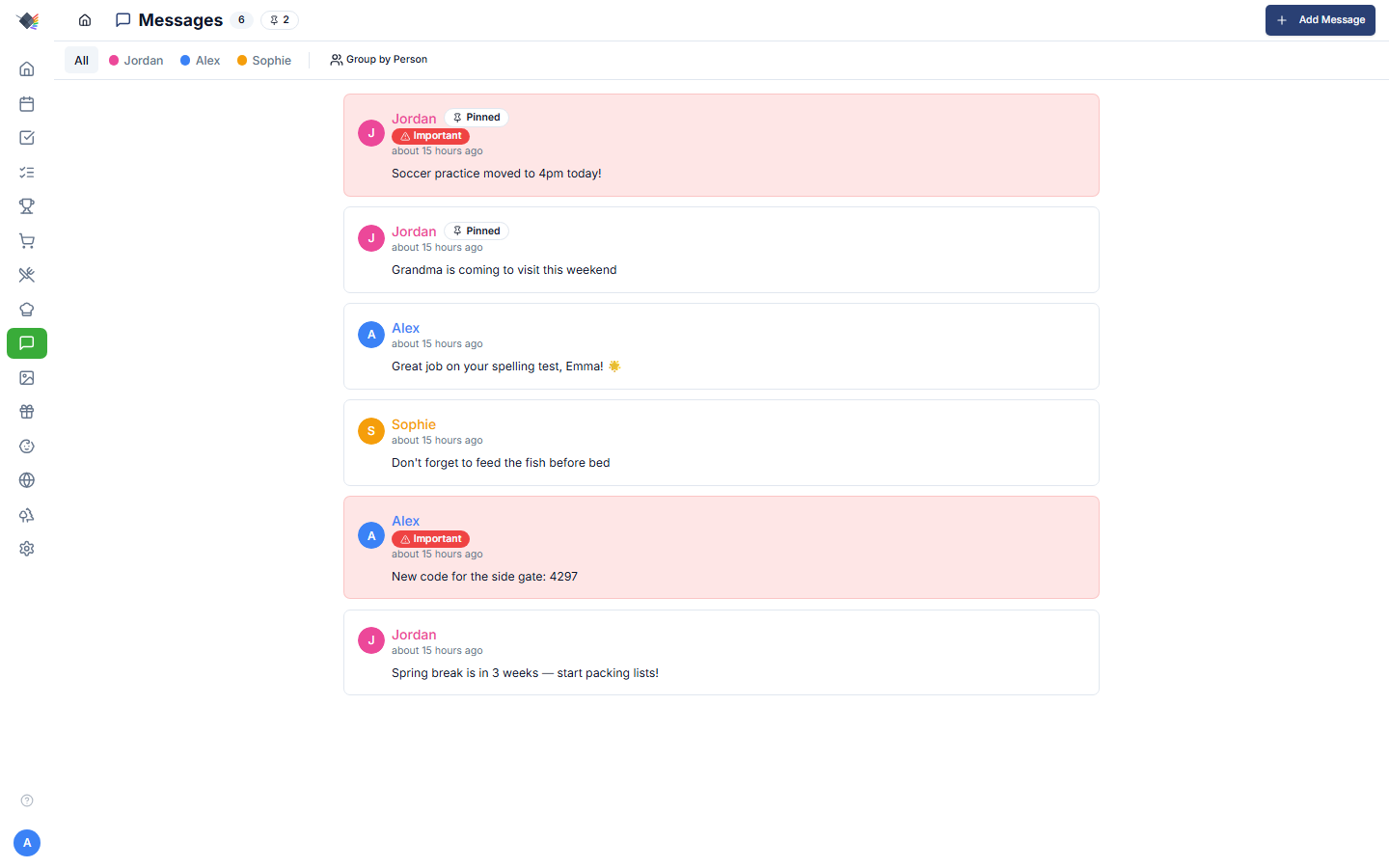
Family message board for shared updates. Lower-friction than texting (no notifications, no group chat noise), more persistent than a sticky note on the fridge. Built for the "drop a note that everyone will see when they walk past the wall display" pattern.
What a message has
- Message text: what you're saying. Up to 500 characters (a live counter shows remaining length while posting/editing).
- Author: whoever was logged in when it was posted.
- Pinned: boolean. Pinned messages sort to the top regardless of age.
- Important: boolean. Renders with red accent / icon for visual emphasis.
- Expires at: optional timestamp. After the window passes the message is hidden from all views (filtered server-side on read); the row stays in the database.
- Created at / Updated at: auto.
Posting
Two ways:
- From the dashboard MessagesWidget: the + (Add message) button opens the Post Message dialog.
- From the full Messages page: nav → Messages → input at the top.
Both require login. The author is auto-set to the logged-in user; you can't impersonate someone else.
Notes from the babysitter
While Babysitter Mode is on, the babysitter can leave a note from the Babysitter Mode screen or the /babysitter page, without logging in. It appears on the board as Babysitter (or Babysitter (Sam) if they gave a name) with a 🍼 avatar. See Display Modes.
Expiration
Pick from a dropdown when posting:
- No expiration (default).
- 12 hours
- 1 day
- 2 days
- 3 days
- 7 days
Useful for temporary notices: "Pizza in the fridge from tonight" (expires in 12h), "Snow day: no school" (expires in 1d), "Hosting brunch Sunday, RSVP by Friday" (expires in 3d).
Once a message's expiration window passes it is hidden from every view (the server filters expired rows out on read). The rows themselves remain in the database. There is no periodic purge job.
Pinning
Pinning is chosen when you post, via the Pin to top checkbox in the Post Message dialog. There is currently no in-list pin/unpin toggle. To change a message's pinned state you re-post it. Pinned messages:
- Sort to the top of the list (above everything, regardless of age).
- Render with a slight visual highlight (pin icon, subtle background tint).
Pin the standing-house-rules-style notes ("WiFi: TacosForever42", "Gate code: 4297").
Important flag
Mark a message important for visual emphasis:
- Red icon / accent next to the message.
- Slightly darker background tint.
- Reads as a louder version of "you should look at this."
Independent from pinning, a message can be pinned + important, just pinned, just important, or neither.
Editing
Hover over a message (or tap on mobile) to reveal the pencil icon. Click to edit in place:
- Text becomes an inline editable textarea.
- Ctrl+Enter to save.
- Escape to cancel.
- The author + created-at stay;
updated_atrefreshes.
Anyone can edit their own messages. Parents can edit any message.
Deleting
Trash icon on each message (visible on hover/long-press):
- Authors can delete their own messages.
- Parents can delete any message.
- Children cannot delete others' messages.
- Notes from the babysitter can be edited or deleted by a parent only.
A confirmation dialog ("Delete this message?" / "This action cannot be undone.") appears before the message is removed. Deletion is permanent. There is no undo.
Group by person
The Messages page has a Group by Person toggle:
- Off: one chronological list, newest first (pinned first within that).
- On: messages organize into person-colored cards (one card per family member). Each card shows that person's recent messages.
Group-by mode is useful when you have a lot of message traffic and want to see "what has Jordan posted recently?" at a glance.
Dashboard MessagesWidget
The widget shows the most-recent N messages with:
- Author avatar + name (color-coded).
- Message text (truncated if very long; tap to expand).
- Pinned / important badges where applicable.
- A + (Add message) button that opens the Post Message dialog. There is no inline text input on the widget.
Sized for a corner of the dashboard.
Use cases
Standing house info
Pin notes for things everyone should always be able to find:
- WiFi password.
- Door / gate codes.
- Trash + recycling pickup day.
- House rules.
- "If something breaks, the breaker box is in the garage."
These pinned messages function as a lightweight house wiki.
Time-sensitive announcements
Expire-in-1-day messages for things that matter today and not tomorrow:
- "Pizza in fridge from tonight."
- "Don't use the upstairs shower. Fixing it Wednesday."
- "Mom's at the dentist 'til 3."
Encouragement / "great job"
A throwaway "Great job on your spelling test, Emma! 🌟" lands in the family's space without needing a phone notification.
Coordination between parents
Sometimes you and your spouse need a shared note that's more durable than a text. Posting "Grandma is coming Sunday" as a message ensures both of you see it next time you walk past the dashboard, and you can pin it until she's gone.
Privacy
Messages are family-internal: only logged-in family members see them. The babysitter and away-mode views do not show messages. A babysitter can add a note while Babysitter Mode is on, but cannot read the board, including their own notes.
Messages live in your Prism database. No external sync to MS To Do, Google, or anywhere else (intentionally: messages are ephemeral; they're not lists, they don't belong in a task-tracking system).
Troubleshooting
Message vanished after a few hours
Most likely an expiration was set. Check the expiration dropdown when posting. The default is "No expiration."
Edit pencil doesn't appear
Either: - Not logged in. (Messages are read-only when no user is authenticated.) - Not the author and not a parent. Children can't edit others' messages.
Message order looks weird
Sort is: pinned first (within pinned, newest first), then non-pinned by created_at descending. If you're seeing different order, you're probably looking at the per-person grouped view, where each person's section sorts independently.
Important badge color clashes with theme
The important-message accent uses your theme's destructive color (typically red). On the default light theme it's pure red; on dark theme it's slightly muted. Custom theme palettes may override, so check Settings → Appearance.