Tasks
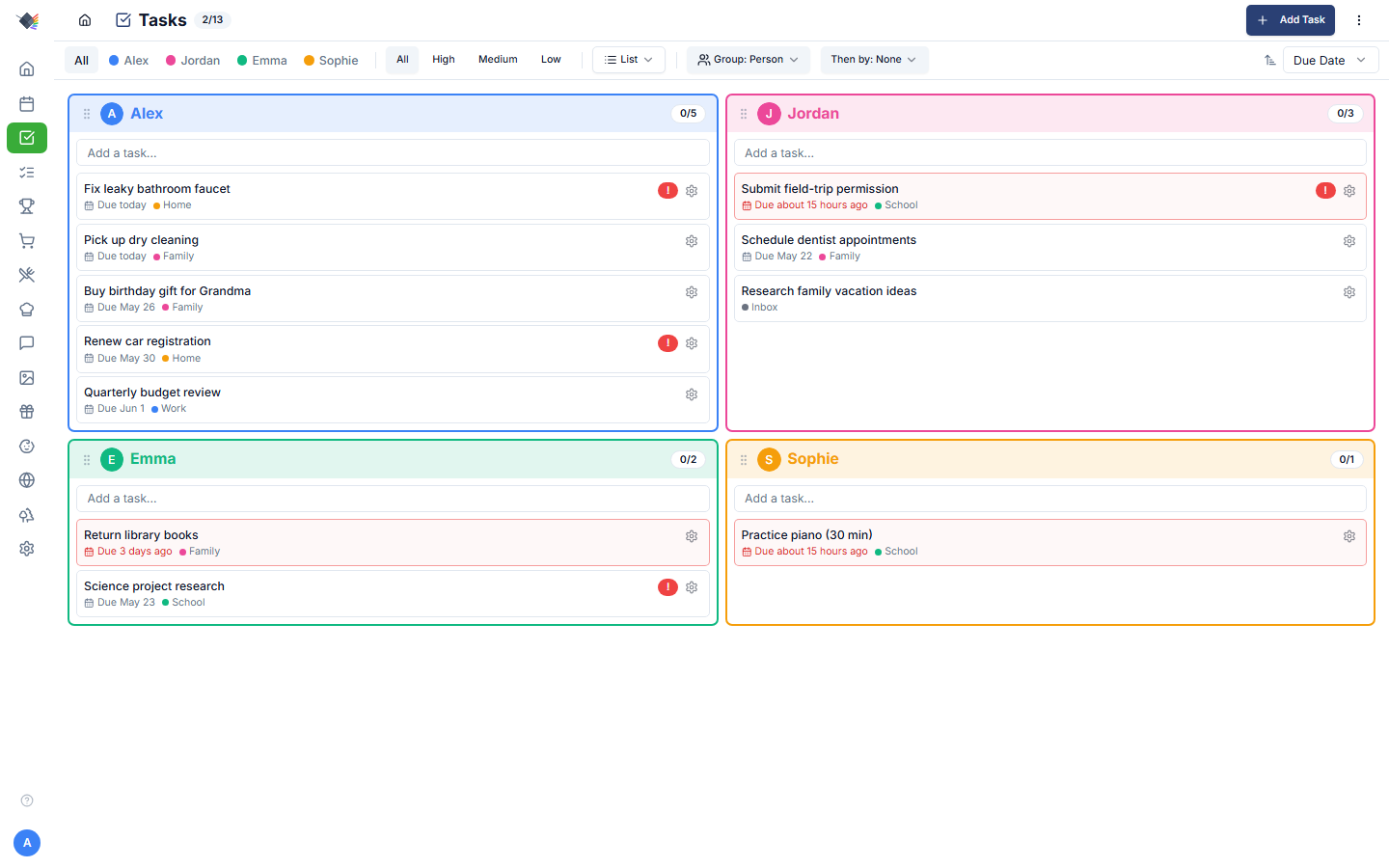
To-do items with assignment, due dates, priorities, lists, and bidirectional sync to either Microsoft To Do or Google Tasks. Pick whichever your family already uses; same UI in Prism either way.
What's in a task
- Title (required)
- Description: not editable in the Prism task modal; it only round-trips from Microsoft To Do / Google Tasks notes on sync.
- List: which task list it belongs to. Nullable (inbox).
- Assigned to: family member, or unassigned.
- Due date: date+time, optional.
- Priority: high / medium / low. Defaults to medium; there is no "none".
- Category: free-form tag (
Health,School,Errands,Shopping). - Completed: boolean. When completed,
completedAtandcompletedBypopulate.
Task lists
Lists are the primary organizational unit. Common patterns:
- Inbox: catch-all for unsorted tasks.
- Family: household-shared (groceries, errands).
- Home: house maintenance, repairs.
- Work: per-parent work tasks.
- School: per-child school tasks.
Create lists in Settings → Integrations → (Google or Microsoft) card → New List. Each list has:
- Name
- Color: colored dot in the picker + per-task tag.
- Sort order: drag to reorder in the picker.
- External sync source: optional Microsoft To Do or Google Tasks list to bidirectionally sync with.
Delete a list and its tasks become unassigned (moved to the inbox); they're not deleted.
Adding tasks
- Add Task button: opens the modal with all fields.
- Inline text input: at the top of the Tasks page, type a title, press Enter, task created in the current filter view.
Both require login (parent or child). The inline form auto-assigns the current logged-in user as createdBy.
Completing tasks
Tap the checkbox to mark complete. The row strikes through and dims. The undo button in the nav bar lets you reverse the check for ~5 seconds.
If the task syncs to MS To Do / Google Tasks, the completed status propagates to the external provider on the next sync cycle.
Deleting tasks
Parents only. Two places: the trash icon on the task row, and the Delete button inside the task's edit window. Both confirm first.
Deleting a synced task also deletes it in the provider. That happens immediately, not on the next sync. If the provider cannot be reached the task is still removed from Prism and a tombstone stops the next sync re-adding it, so the deletion sticks either way.
Filtering + sorting
- By list: picker dropdown, "All lists" / "Unassigned" / specific list.
- By person: avatar filter pills at the top.
- By priority: filter chip.
- Show completed toggle: off by default. When on, completed tasks appear at the bottom with the strikethrough.
Sort options:
- By due date: overdue first, then today, then upcoming, then no-date last.
- By priority: high → medium → low.
- By title: alphabetical (A→Z).
Grouping
The Group dropdown supports nested grouping:
- None: flat list.
- By Person: cards per family member.
- By List: cards per task list.
- Then by secondary group: when the primary group is Person, you can also sub-group by List (or vice versa). Sub-groups render as colored left-border dividers inside the primary group card.
The drag-reordered order of the group columns persists to localStorage (prism:task-group-order when flat-grouped, prism:task-nested-group-order when nested). The chosen grouping mode itself is not persisted.
Reordering
Drag-and-drop within a group (touch + mouse). Note there is no per-task order persistence: only the drag order of the group columns is stored (see Grouping).
For cross-list moves, drag a task onto a different list's card header to reassign.
Sync providers
Pick one provider per Prism instance:
Microsoft To Do (bidirectional)
- Settings → Integrations → Microsoft card: connect your account.
- In the same card, for each Prism list pick an MS To Do list to sync it with.
Bidirectional, newest-wins. Fields synced: title, notes (= description), completed, due date.
Steps (MS To Do's sub-items) are not imported — Prism has no subtask concept, so they are skipped rather than flattened. Attachments are not imported either.
Google Tasks (bidirectional)
- Settings → Integrations → Google card: connect your account (same Google OAuth used for Calendar, Tasks scope added).
- In the same card, pick which Google Tasks list maps to which Prism list.
Same shape as MS: bidirectional, newest-wins, title + notes + completed + due date. Subtasks and attachments are not imported.
No public web address? Google's browser sign-in needs a redirect address
it will accept, which a home-network-only install does not have. Use
Connect without a public URL (advanced) on the same card and paste a refresh
token minted in Google's OAuth Playground — include
https://www.googleapis.com/auth/tasks in the scopes. Prism then takes you
straight to the list picker. See CALENDAR.md for the full walkthrough; the
only difference is the scope.
Removed tasks are held for review
When a task you sync stops being listed by the provider, Prism does not delete it. It stays visible and a Review button appears in the Tasks header, where a parent chooses per task:
- Delete — remove it from Prism too.
- Keep — turn it into a local task. It stops syncing, and is never pushed back to the provider it was removed from.
Two safeguards sit in front of that:
- A task must have been missing for longer than one sync interval before it is flagged, so a task you just created is never reported as deleted, and a single missed response flags nothing.
- If an unusual number vanish at once — more than ten, or at least half of a set of four or more — nothing is flagged at all and the source records an error instead. That is the shape of an outage rather than of housekeeping, and burying you in entries would invite a bulk confirm.
A task that reappears at the provider clears its own flag on the next sync, with no action from you.
Apple Reminders (CalDAV) task sources behave the same way.
Auto-sync
- Parents only. A child profile does not run sync; the page still shows tasks, it just does not fetch new ones.
- Fires on dashboard mount if last sync is stale (>5 minutes ago).
- Background sync every 5 minutes via the polling hook.
- Pauses when the browser tab is hidden.
- Re-fires on visibility return.
- Also covers the screensaver mode when the Tasks widget is shown.
Manual sync button always available, useful right after adding a task on the other side.
Undo
A global undo stack covers tasks, chores, shopping items, and wishes. After completing or deleting a task, an Undo button appears in the nav bar for ~5 seconds. Tap to reverse the most recent action.
Mobile behavior
- Single-column layout.
- Compact header.
- Collapsible filters: tap "Filters" to expand/collapse.
- GripVertical drag icons hidden (touch-drag uses long-press on the row).
- Card-level drag disabled so vertical scroll works naturally; item-level drag still works.
Common workflows
Recurring chore that's really a task
Sometimes "Take out trash every Friday" is more of a personal todo than a points-eligible chore. Add it as a task with a weekly due date in the Home list. When you complete it, manually duplicate it with next Friday's date.
(Native recurring-task support isn't shipped; it's tracked as a follow-up.)
Grocery list as tasks
Some families prefer the Shopping page; others would rather have everything in one task list. The Microsoft To Do sync lets shopping items flow into a To Do list automatically. See the Shopping guide for the per-list sync config.
Sharing a list with a non-Prism family member
The MS To Do / Google Tasks sync is the bridge. Share the Microsoft/Google list with the other person on their side; they see and edit in MS To Do or Google Tasks, you see the same data in Prism via the sync.
Troubleshooting
Tasks not syncing
- Settings → Integrations → (Google or Microsoft) card: is the provider still connected?
- In the same card: is the per-list connection enabled?
- Tap Sync now to force a refresh.
- Check the external list directly: does it have the task you expect?
Two-way sync created duplicates
Usually a one-time glitch when a task was created in both places before the first sync ran. Delete the duplicate; the deletion propagates.
Completed task came back uncompleted
The external system marked it incomplete and the newest-wins resolver applied that update. Check what happened on the external side; mark complete again if you want it gone.
"Create List" button missing
Lists are created from Settings → Integrations → (Google or Microsoft) card → New List. There's no inline list-creation button on the Tasks page; the picker only shows existing lists.
List deletion deleted my tasks
It shouldn't: tasks become unassigned (inbox) when a list is deleted. If tasks did disappear, check the audit log (Settings → Activity Log) for the actual operation.
Sub-grouping (Person → List) looks weird
The nested group view is opinionated about visual hierarchy: primary group as the card, sub-groups as colored-left-border dividers. If the nested mode confuses the layout, switch to a single grouping level or "Group: None" and sort instead.